See Tiny Details Hands-Free — LED Magnifying Glasses 2X–24X
See Tiny Details Hands-Free — LED Magnifying Glasses 2X–24X































BUNDLE & SAVE
Couldn't load pickup availability
-
Ordered
- - -
Order Ready
- - -
Delivered

See Tiny Details Hands-Free — LED Magnifying Glasses 2X–24X
Tiny Parts Are Hard Enough to Work With — You Shouldn't Have to Hold the Magnifier Too
This wearable LED magnifier keeps enlarged detail directly in front of your eyes while leaving both hands available for tools, components and your project.

Close-Up Work Gets Frustrating When You Can't See What Your Hands Are Doing
Tiny screws, solder joints, watch components, jewelry parts and fine craft details can become difficult to inspect with the naked eye alone.
Small screws and parts can be difficult to position when details are hard to distinguish.
Holding a magnifying glass means one less hand available for your project.
Fine details become even harder to inspect when the work area is dim.
Switch Magnification Instead of Switching Tools
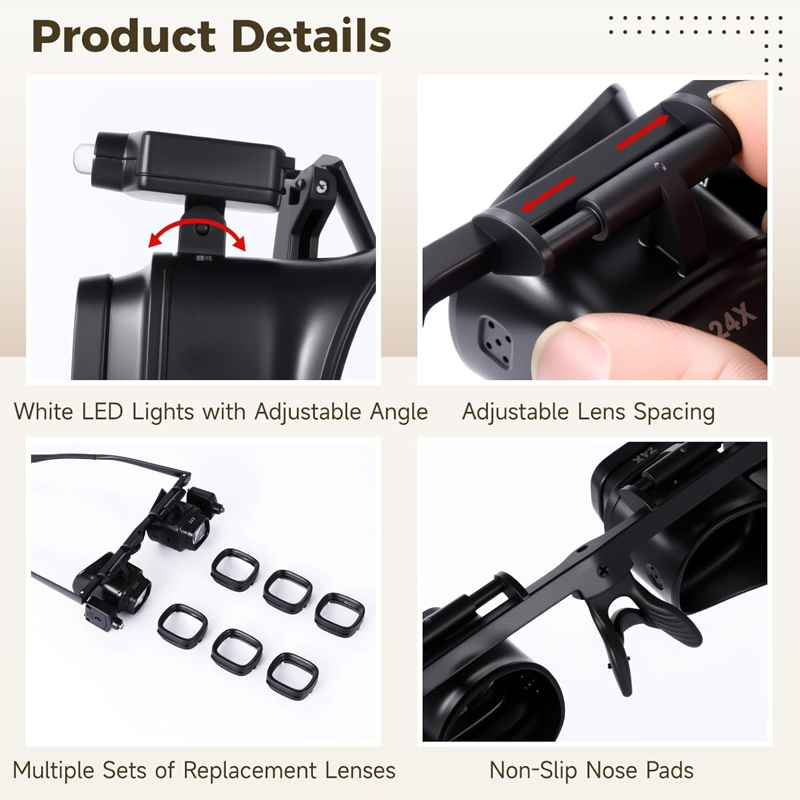
Different jobs need different levels of enlargement. The interchangeable lens system lets you choose from the listed magnification levels based on the detail you're trying to inspect.
Select a suitable magnification level for the task.
Move closer or farther from the object until the detail comes into focus.
Keep your tools and components in both hands while viewing the enlarged area.

Get a Closer Look at Fine Details
The optical lens system enlarges the work area so small details can be inspected more easily during repairs, crafts and other close-up tasks.
Enlarge small text, components and surface details.
Match the magnification level to the scale of the task.
Keep the magnifier positioned in front of your eyes rather than holding it separately.
Useful when inspecting or manipulating small parts.

Two LEDs Help Bring More Light to the Detail
Built-in LED lights sit close to the viewing area, providing additional illumination when your desk lamp or room lighting doesn't reach the exact spot you're working on.
Two integrated light sources provide extra task illumination.
Position the lights toward the small component or surface you're inspecting.
The supplied specification lists four CR1620 batteries as the power source.

No Stand to Set Up. No Magnifying Glass to Hold.
The glasses-style frame uses a lightweight ABS construction so the magnifier can stay positioned in front of your eyes while you work.

From the Workbench to the Craft Table
The combination of magnification, wearable positioning and LED lighting makes the set useful for many tasks where small details matter.
Inspect small screws, movements and components at close range.
Get a closer view while handling small pieces, settings or details.
Useful for inspecting small boards, solder areas and components.
Helpful for model work, miniature painting, sewing and other detailed projects.
What to Know Before You Order
Two Small Setup Details Make a Big Difference
Remove the plastic insulation tabs from both battery compartments before trying the LEDs.
Adjust the distance to the object whenever you switch magnification levels.
Higher magnification is best reserved for very small details because the usable working distance becomes shorter.
Frequently Asked Questions
What magnification levels are included?
The supplied product information lists 2X, 4X, 6X, 8X, 10X, 12X and 24X magnification levels.
Can I use both hands while wearing it?
Yes. The glasses-style frame is designed to hold the magnifier in front of your eyes so both hands remain available for your work.
Does it have built-in lighting?
Yes. The product information lists two integrated LED lights.
Why does the object look blurry at higher magnification?
Higher magnification has a shorter focal distance. Move the object or your viewing position until the image becomes clear.
What batteries does it use?
The supplied specifications list four CR1620 batteries.
Why won't the LED lights turn on when I first receive it?
Check both battery compartments and remove any plastic insulation tabs before use.
What kinds of projects can I use it for?
Typical uses include electronics, watch work, jewelry, miniature crafts, model work and other tasks involving small details.
Should I always use the highest magnification?
Not necessarily. Lower magnification gives a larger working area and greater working distance. Select the power that fits the task.
See the Small Parts. Keep Both Hands on the Job.
Switch magnification, add light where you need it and keep your tools in both hands for the detailed jobs that are hardest to see.
Choose your option above and bring the details closer.