High-Quality Flash Memory Chip USB Thumb Drive
High-Quality Flash Memory Chip USB Thumb Drive
BUNDLE & SAVE
Couldn't load pickup availability
-
Ordered
- - -
Order Ready
- - -
Delivered

High-Quality Flash Memory Chip USB Thumb Drive
Make Room For The Next Memory — Without Deleting The Last One.
Move photos, videos and everyday files off your phone, keep an offline copy, and carry them between supported phones, tablets and computers with one compact multi-interface drive.

Storage Full Again? Keep The Memory.
The worst time to run out of storage is right when something worth keeping is happening. Instead of deleting old photos and videos just to make room for the next one, move files off your device and keep them close.

Plug In. Open Files. Move.
On supported iPhone and iPad workflows, connect the drive and manage files through the system Files app. On compatible Android devices, OTG support allows the drive to appear in the device's file manager.


Stop Letting Files Get Trapped On One Device.
The multi-interface design is built for people who move between phones, tablets and computers. Transfer a travel photo to your laptop, move a work file to your phone, or carry a local copy between devices without relying on a cloud upload every time.
Move Everyday Files Without Long Cloud Uploads.
The supplied product information lists transfer performance of up to 30 MB/s read and up to 20 MB/s write. Actual speed can vary with the connected device, interface, file size and file type.


Your Files. Even Without Wi-Fi.
A local copy does not depend on a live internet connection. Keep travel photos, videos, presentations or other useful files with you on flights, road trips, hotel stays or other places where cloud access may be slow or unavailable.
Pocket-Size Storage. Everyday Convenience.
The compact format is designed for everyday carry in a pocket, work bag or camera pouch, giving you another storage option without carrying a full-size external drive.
For portability, work, travel and everyday file storage. Exact dimensions and weight should be checked against the selected product variant before publishing.
Recommended visual: product held between fingers, slipped into a pocket or placed in a small travel pouch. Avoid adding dimensions or weight unless your supplier confirms them.

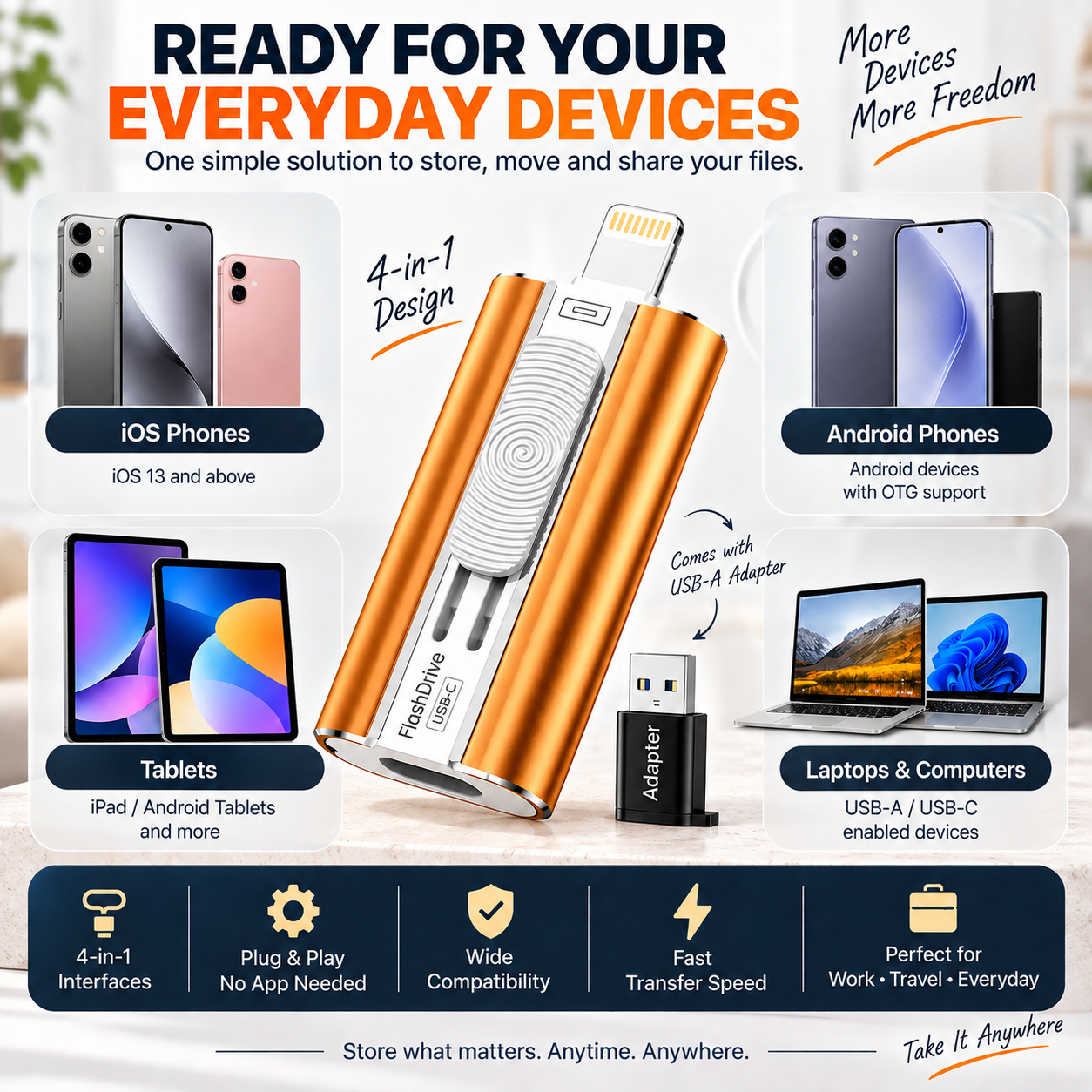
Ready For Your Everyday Devices.
Compatibility depends on the interface and device. Use the connector that matches your hardware and confirm the requirements below before ordering.

For compatible Lightning devices using iOS/iPadOS 13 or later, files can be managed through the system Files app.
For supported newer phones, tablets and computers with a compatible USB-C port.
OTG support is required. The drive typically appears in the device's File Manager when supported.
Connect through a compatible USB-C interface or the supplied USB-A adapter where appropriate.
A Small Drive With Several Everyday Jobs.
Move older photos and videos to local storage instead of immediately deleting files you still want to keep.
Use one compact drive to bridge supported phones, tablets and computers.
Carry important files locally when cloud access is inconvenient or unavailable.
The drive itself is local storage. Cloud services remain optional rather than required for storing files on the drive.
Product Details
Transfer-speed note: Real-world speeds vary with device, connector, file type, file size and operating conditions. Avoid presenting a fixed transfer time for a specific file unless you have tested that exact setup.
Frequently Asked Questions
Do I need to download an app?
For the supported iPhone/iPad workflow described in the supplied instructions, no separate app is required: connect the drive, open the system Files app, return to Browse and locate the external drive. Android handling depends on the device and its built-in File Manager.
How do I use it with an iPhone or iPad?
For compatible Lightning devices running iOS/iPadOS 13+, connect the drive, open Files, tap Browse and locate the external drive. You can then move supported files to or from the device.
How do I use it with Android?
Your Android phone or tablet must support OTG. When supported, the drive should appear in the device's File Manager or storage browser.
Will it work with every phone and tablet?
No storage accessory should be described as universally compatible. Your device must have a matching supported connector and, where required, OTG or a compatible operating-system version.
Do I need Wi-Fi or cloud storage?
No for local storage and access. Files stored on the drive can be accessed without an active internet connection on a supported connected device.
Can it completely protect my files from loss?
No single storage device should be treated as the only copy of irreplaceable files. For important photos and documents, keep more than one backup in separate locations.
What file types can I store?
The drive can store common file types such as photos, videos, audio and documents. Whether a connected device can open a particular format depends on that device's operating system and installed apps.
Keep The Memory. Free The Space. Take Your Files With You.
Turn one compact drive into extra breathing room for photos, videos, work files and everyday device transfers — without making cloud storage your only option.
CHOOSE YOUR STORAGE OPTION ↑Confirm capacity, connector type and device compatibility for the exact variant before ordering.