🔌 Dual-Head Extension Cord – 6 AC Outlets, 4 USB-A & 2 USB-C Charging Ports
🔌 Dual-Head Extension Cord – 6 AC Outlets, 4 USB-A & 2 USB-C Charging Ports
Couldn't load pickup availability
-
Ordered
- - -
Order Ready
- - -
Delivered

🔌 Dual-Head Extension Cord – 6 AC Outlets, 4 USB-A & 2 USB-C Charging Ports
Bring Power to Both Sides of the Room.
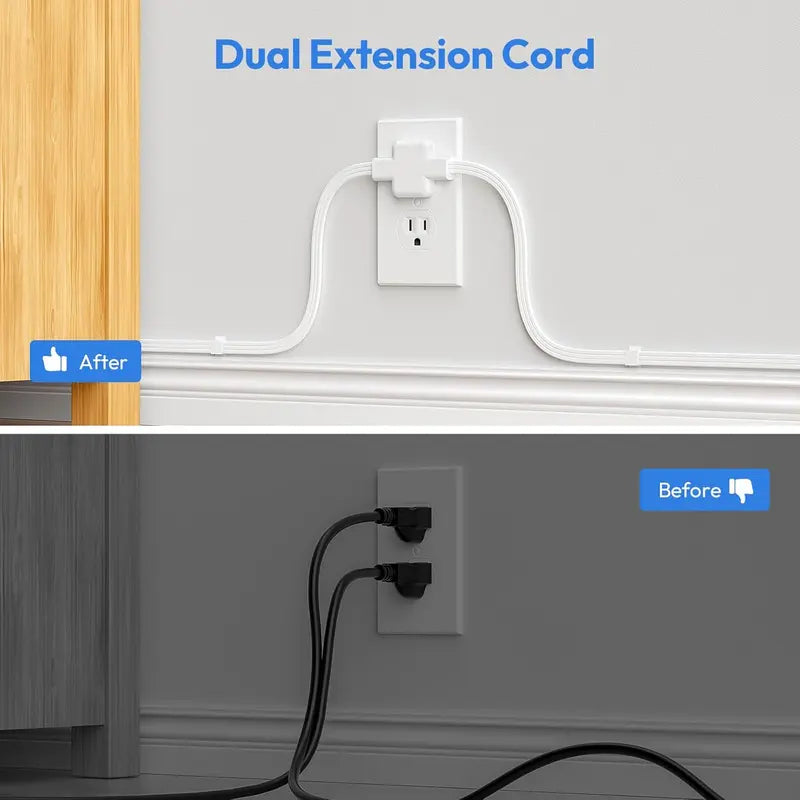
Turn one grounded wall connection into two convenient charging areas. Route one compact power module in each direction and keep everyday devices easier to reach.

One Outlet Should Not Decide Where Everything Goes.
When the nearest outlet sits between two nightstands, desks or sofa ends, a traditional single-head strip leaves one side reaching. This split design sends useful connections in both directions.
One Crowded Charging Spot
Long charging cables cross furniture while bulky adapters compete for the same small area.
Two Easier-to-Reach Zones
Place one module on each side so power and USB connections stay closer to where they are used.

One Wall Connection. Two Useful Destinations.
Both branches share the product's total electrical limit, while the physical split lets you position the two charging modules in separate locations.
Power Zone One
Place beside one nightstand, desk or sofa end.
Power Zone Two
Route the second branch to the opposite side.

Two Compact Modules. Twelve Connection Points.
Each module provides three AC outlets, two USB-A ports and one USB-C port. Together, they create a flexible everyday charging setup without concentrating every plug in one place.


Designed to Work Around Your Space.
Connections are distributed across the front and sides, while the back of each module includes a keyhole slot and four corner pads for more flexible placement.
- One front-facing AC outlet per module
- Two side-facing AC outlets per module
- Two USB-A and one USB-C port per module
- Rear keyhole slot for compatible wall mounting
- Corner pads help stabilize the modules on surfaces
Put Power Where People Actually Need It.
The split-cord layout is especially useful when two people or two furniture zones need access to the same wall connection.
Both Sides of the Bed
Keep phone chargers, lamps and other compatible devices closer to each nightstand.
Two Work Areas
Route one module toward each desk instead of crowding every adapter into one strip.
Sofa & Living Room
Bring charging access closer to opposite seats, side tables or entertainment accessories.
Dorm Rooms
Share one conveniently located connection between two sides of a compact room.
Hotel Stays
Create more accessible charging points when room outlets are limited or inconveniently placed.
Everyday Home Setup
A practical option for bedrooms, offices and other dry indoor areas.

Plug In. Split the Routes. Power Both Sides.
Plan the cord path first and keep every connection within the product's confirmed electrical rating.
Connect
Insert the grounded plug into a compatible indoor wall outlet.
Route
Direct the two cord branches toward separate locations.
Position
Place or securely mount each module where it stays accessible.
Connect Devices
Add compatible devices without exceeding the shared total rating.
Know the Layout Before Ordering.
The port arrangement below is confirmed from the supplied product video. Match all electrical specifications to the exact version selected for sale.
Safety: Both branches share one product-wide electrical limit. Do not exceed the rating printed on the exact unit. Do not advertise surge protection, PD fast charging, water resistance or high-power appliance compatibility unless these claims are supported by the supplier's documentation and certification for the same model.
Frequently Asked Questions.
How many connections does the product provide?
Across both modules, the supplied product video shows 6 AC outlets, 4 USB-A ports and 2 USB-C ports—12 connection points in total.
Can the two modules be placed on opposite sides of a room?
Yes. The product uses two separate physical cord branches so the modules can be routed in different directions, subject to the actual cord length of the selected version.
Does the USB-C port support PD fast charging?
A USB-C connector alone does not confirm Power Delivery support. Check the stated USB output and charging protocols for the exact SKU before promising fast charging.
Is this a surge protector?
Only describe it as a surge protector if the exact model has documented surge protection and a confirmed joule rating. Otherwise, position it as a dual-head extension cord or power strip.
Can the modules be mounted?
The video shows a rear keyhole slot on each module. Use compatible mounting hardware and make sure the installation is secure. Mounting hardware is not shown in the supplied video.
Can I use high-power appliances with it?
Do not connect any device that would exceed the product's total rated current or wattage. Confirm the exact electrical rating before use, especially for heaters, hair dryers, microwaves, air conditioners and other high-load appliances.
Do both branches have separate power limits?
No separate limits are established by the video. Treat both branches as sharing the total rating of the complete product unless the manufacturer's documentation states otherwise.
One Connection. Two Better-Placed Charging Zones.
Stop routing every cable toward the same crowded corner. Bring AC and USB connections closer to both sides of the space with one smart split-cord layout.
CREATE TWO POWER ZONES →